SaaS Content Writer at Chatway focused on customer support and engagement. I write about live chat strategies that drive better engagement, satisfaction, and conversions.
Summary
This article compares Shopify Inbox and Chatway Live Chat to help e-commerce businesses choose the right support tool. Shopify Inbox is a free, simple option built directly into Shopify, ideal for smaller stores. In contrast, Chatway is a multi-platform, omnichannel tool offering advanced customizations, automations, and scalability, though its premium features require a paid subscription.
Key takeaways
Shopify Inbox is completely free, integrated directly into Shopify, and manages basic customer store chats.
Chatway supports multiple channels like WhatsApp, Instagram, and Facebook Messenger within a single shared inbox.
While Shopify Inbox lacks advanced reporting, Chatway provides detailed analytics and real-time website visitor insights.
Chatway's free plan allows only one seat, meaning growing teams must upgrade to paid tiers.
If you run an e-commerce business, attracting and retaining customers should be among your top priorities. The more people are happy buying what you offer, the more profits you’ll generate.
However, building strong relationships with your customers goes beyond offering a high-quality product or service. You need to improve your interactions with the people who contact you through your website. That’s why live chat has become an essential resource in the e-commerce universe.
How can you integrate shopify live chat into your e-commerce site? You’d be surprised to know that there are many options. Two of the most popular solutions for Shopify users are Shopify Inbox and Chatway.
What is the better alternative between those two Shopify live chat options? Is Chatway the ideal software to improve communications with your customers? Will Shopify Inbox meet your business’s needs?
This article compares both solutions to help you choose the right one for your Shopify live chat app. Read on!
Shopify Inbox
Before comparing both options, it’s important to carefully evaluate each one, starting with Shopify Inbox.
Overview
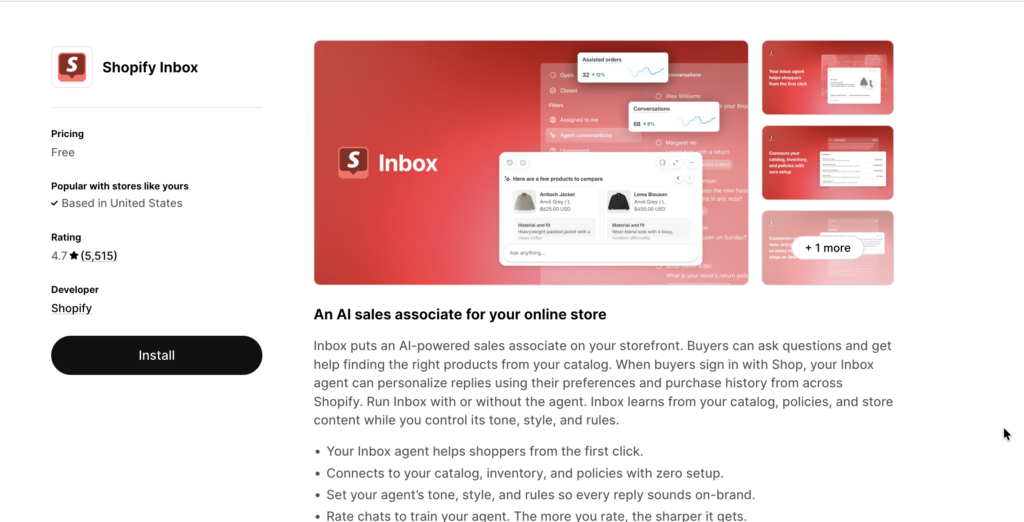
Shopify Inbox is a free chat app built directly into Shopify. It requires no extra cost or setup beyond installing the Shopify Inbox app. You manage all conversations from the Shopify admin or the Inbox mobile app (iOS/Android). Inbox can pull in chats from your store’s front end and the Shop App, giving your team a centralized inbox. Key capabilities include real-time messaging, automated greetings/away messages, and quick replies. Since it’s part of Shopify, it automatically syncs with your store data.
Key Features
Do you want to know if Shopify Inbox can benefit your business? To determine if this solution is effective, you should take a look at its main features, which are:
Free and Integrated: Shopify Inbox is included with your Shopify account and installs with one click. No monthly fees are required.
Unified Conversations: Chats are managed right in the Shopify admin (or Inbox app), with team collaboration. You and your staff can respond to customer messages, send product images/links or discount codes, and see order/cart status. Messages sync across desktop and mobile so agents can chat on-the-go.
E-commerce Context: Shopify pulls in customer/cart data into the chat. Agents can view what’s in a visitor’s cart in real time and send relevant products or custom coupons over chat to close sales.
Automation & AI: You can set up automated greetings, away messages, and triggers (e.g. “welcome” messages or cart-abandonment follow-ups). Shopify’s AI features can suggest FAQ answers and personalized replies based on your product catalog, store policies and blog content. (Shopify recently added an “Inbox agent” – an AI chatbot – which can automatically answer customer questions about products, returns or shipping using your store’s data.)
Customization: Basic widget styling is available (button color, greeting text, open hours), but deeper theming or branding options are very limited.
Mobile App: Shopify Inbox has dedicated iOS/Android apps, so your team can chat from their phones. Push notifications ensure you never miss a message.
Pros
Cost & Simplicity: It’s entirely free and requires no extra tools – ideal for new or small stores. Setup is effortless.
Sales-oriented: Built for Shopify, it tightly integrates product info and cart data. Agents can instantly share products and offer discounts within the chat, turning support conversations into sales.
Unified Platform: Since it lives in Shopify’s ecosystem, you don’t need multiple apps. All customer interactions (chat and email) stay in one place, streamlining support workflow.
Built-in AI: Shopify AI suggestions speed up responses. According to Shopify, a large share of Inbox chats involve purchase decisions, and AI tools help convert them into checkouts.
Cons
Limited Customization: Users note Inbox has very basic customization. You get minimal control over the chat widget’s look or chat-flow; advanced theming isn’t supported.
Basic Analytics: Reporting is minimal. Inbox can tag chats (e.g. “sales lead”) but offers no detailed analytics dashboard. Many merchants complain of “zero reporting features” – you can’t easily track chat metrics or use tags to filter reports.
Shopify-Only: By design, Inbox only works on Shopify stores (and the Shopify/Shop apps). If you sell on other platforms or need omnichannel chat, it won’t help outside Shopify. As you grow, Inbox’s single-channel focus may feel restrictive.
Chatway Live Chat
Now, it’s time to evaluate the second option in this comparison: Chatway. Is it really beneficial for e-commerce businesses? Find out more about this solution below.
Overview
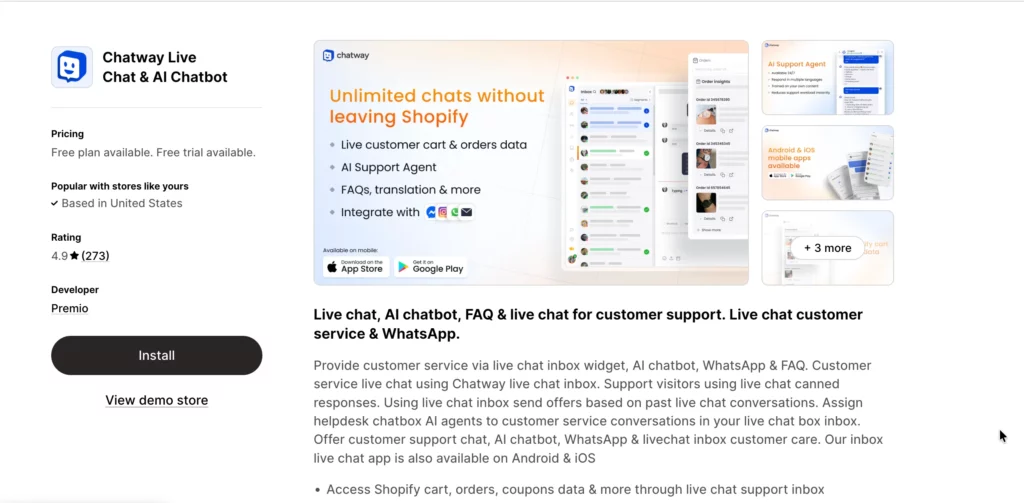
Overview: Chatway is a standalone live-chat and customer messaging platform that integrates seamlessly with Shopify (as well as WooCommerce, Wix, Duda, WordPress, BigCommerce, etc.). Unlike Shopify’s native app, Chatway is a multi-channel tool: it can embed a chat widget on your site and also pull in Facebook Messenger, Instagram DMs, WhatsApp Business and email into one shared inbox. It’s designed for businesses of all sizes and packs many advanced features (AI chatbot, extensive automations, team inbox, etc.). Chatway offers a free tier as well as paid plans, and has dedicated mobile apps (iOS/Android) for on-the-go support.
Key Features
Do you want to know if Chatway is a good option for you? Explore its features and determine if they meet your needs.
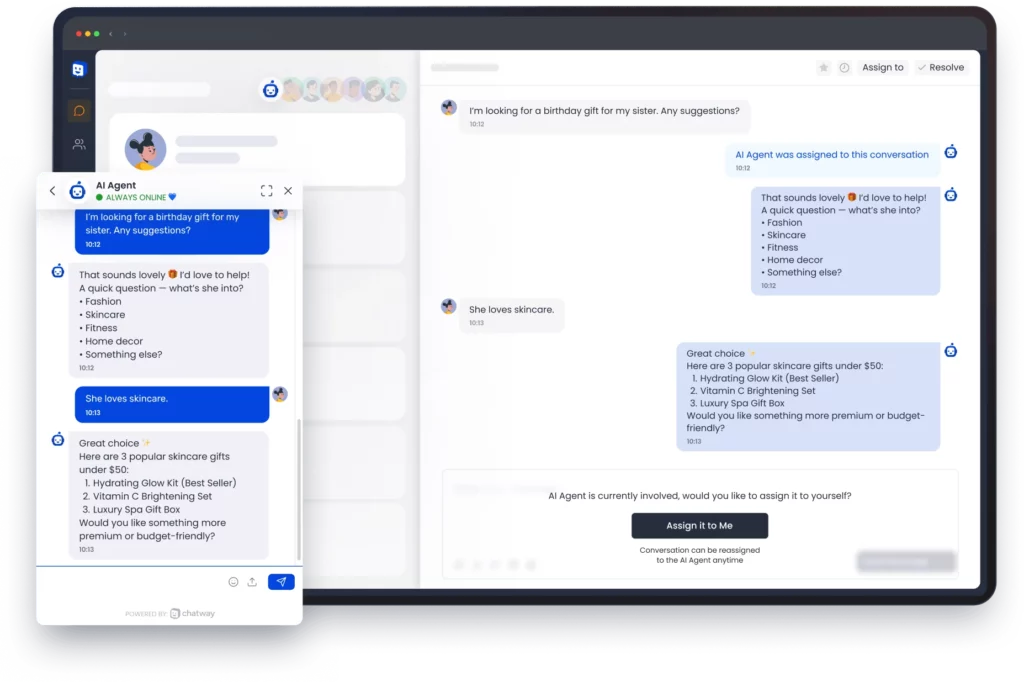
Multi-channel Inbox: All conversations merge into a single inbox. Website visitors, Facebook Messenger, Instagram, WhatsApp and email messages all arrive together for your agents. Chatway even adds optional buttons to your widget (WhatsApp, phone, Telegram, etc.) so customers can easily switch channels.
Multi-platform: Besides Shopify, Chatway works on virtually any site. The same account can be installed on Shopify, Wix, Duda, WordPress and more, making it ideal if you manage multiple stores or websites.
AI Support Agent: Chatway includes an optional 24/7 AI chatbot that learns from your store’s content/FAQs. This agent answers routine questions in multiple languages using your knowledge base, reducing load on live agents. (Note: unlike Shopify’s free Inbox bot, Chatway’s AI agent is a paid add-on – it costs $0.50 per resolved conversation beyond the first 10 free chats.)
E-commerce Integration: Deep Shopify sync is built in. In Solo plan and above, Chatway fetches customer data (orders, cart contents, etc.) so agents see exactly what a shopper is buying. During chats you can share products, coupons or order details directly from your Shopify catalog.
Customization: The chat widget is highly brandable. You can change colors, text, avatars, and even live-translate both the widget and conversations (supporting 20+ languages).
Team Tools & Automation: Chatway supports chat assignments, private agent notes and user roles (Admin/Agent). It has robust automations: you can set triggers (e.g. greeting messages, surveys or tags based on visitor behavior), and build workflows to route chats or send emails. Canned responses/FAQs let agents reply with saved answers instantly.
Analytics & Visitor Insights: Built-in reporting shows conversation stats. A “Live Visitors” dashboard lets agents see who’s on the site in real time (pages viewed, location, etc.), enabling timely outreach.
Mobile Apps: Chatway offers dedicated iOS/Android apps. Agents can chat from their phones or tablets, receiving push alerts for new messages.
Pros
Scalability & Flexibility: Chatway grows with you. Its multi-site, multi-agent architecture means you’re not limited to one store or a single user. Paid plans allow dozens of seats, multiple websites/inboxes, and advanced workflows. Reviewers praise how quickly it can scale from a single agent up to whole teams.
Omnichannel Reach: With Chatway, you’ll never miss a customer just because they prefer WhatsApp or Instagram. By unifying all channels, it ensures a consistent experience across web chat and social channels.
Advanced Features: Chatway’s feature set is more extensive than Shopify Inbox. Features like unlimited chat history (in paid plans), chat tags, visitor monitoring, file sharing, and detailed analytics give you more power to manage high volumes.
Ease of Use: Despite its rich features, Chatway has a simple, intuitive UI. Multiple users highlight how easy to set up and use it is. The widget configuration and onboarding process are straightforward.
Strong Support: Chatway’s customer support is frequently praised.
Cons:
Limited Free Plan: The free tier is quite basic. It allows only 1 seat and 30 days of chat history. (With one seat, only a single agent can handle all chats – not ideal for growing teams.)
Paid Features for Full Power: Many of the advanced functions require paid plans. Multi-widget support, multiple inboxes (for different sites/channels), workflow automations and priority support are only in higher tiers.
Less Brand Recognition: Chatway is less widely known than major helpdesk/chat apps, so some teams may require familiarization or technical support. However, its high ratings (4.9/5 on G2) and positive reviews suggest most find it easy to adopt.
Full widget customization (branding, social buttons, language) and multi-language support (20+ languages).
AI / Bots
Built-in Shopify Magic AI for auto-suggestions; new Inbox agent answers FAQs using your store data.
AI Support Agent (24/7 chatbot) available as add-on (supports multiple languages, trained on your content).
Scalability
Suited to small–midsize stores. Limited to Shopify ecosystem and up to a handful of agents.
Designed to scale: multi-agent/team support, multiple widgets/inboxes for large sites.
Analytics & Reporting
Basic. Provides conversation tags/auto-categorization and minimal stats.
Analytics and visitor insights.
Choosing the Right Shopify Live Chat
When picking a live-chat solution, consider your specific needs:
Store Ecosystem: If you operate only on Shopify and want a no-cost, zero-setup widget, Shopify Inbox may suffice. But if you sell on multiple platforms (or plan to), Chatway’s multi-platform support is invaluable.
Channels: Do your customers expect Facebook or WhatsApp support? Chatway consolidates social messaging (WhatsApp, Messenger, Instagram, Email) into one inbox. Inbox only covers Shopify’s channels (website chat + Shop App).
Budget: Shopify Inbox is free. Chatway has a free tier, but most advanced features (extra seats, long chat history, full automations) require paid subscriptions. Factor in the cost per agent and any AI usage fees.
Features Needed: Make a checklist of must-haves. If you need sophisticated automations and multilingual AI chat, Chatway clearly offers more depth. Inbox has automation but lacks advanced triggers and reporting. On the other hand, if you only need basic live chat (with product/coupon links) and speed of setup, Inbox delivers those well.
Mobile Management: Both platforms have mobile apps. If you need to respond on the go, both solutions work on iOS/Android. Chatway’s app has a high user rating.
Customization & Branding: Chatway allows much deeper customization of the chat widget (branding, button layout, live translation). Inbox offers only minimal style changes. If brand consistency is a priority, Chatway has the edge.
Security & Compliance: Both tools prioritize security. Shopify (the platform) is PCI/DSS compliant. Chatway’s privacy policy states it uses physical, electronic and procedural safeguards to protect data. If you handle sensitive customer data, you may review each platform’s security details and GDPR compliance.
Ease of Use: Inbox’s native integration means no learning curve with Shopify. Chatway is also praised for its simple interface and fast onboarding. Budget some time for testing whichever you choose.
Final Thoughts
Both Shopify Inbox and Chatway have pros and cons. Shopify Inbox is the obvious free, no-frills choice tightly integrated into Shopify. It’s ideal for small shops that need basic chat, quick setup, and strong Shopify linkage (discounts, cart recovery). Chatway, however, offers a richer feature set and greater flexibility – especially useful if you need omnichannel support, advanced automation or plan to grow beyond a one-person store. Its free plan covers simple use, but unlocking its full power requires a paid plan.
Ultimately, weigh your budget, business size and goals. For a completely free, simple Shopify-only chat, Inbox is hard to beat. But if you’re serious about multi-channel customer engagement and robust chat management, Chatway is a strong modern alternative (its 24/7 AI agent and deep Shopify sync can significantly ease support work).
Want to explore Chatway? Explore the free plan to test out the features and see how it fits your store’s workflow. Both solutions can improve your customer satisfaction and conversion rates – the best choice depends on your specific needs and scale.
SaaS Content Writer at Chatway focused on customer support and engagement. I write about live chat strategies that drive better engagement, satisfaction, and conversions.
SaaS Content Writer at Chatway focused on customer support and engagement. I write about live chat strategies that drive better engagement, satisfaction, and conversions.