Gal Dubinski is the co-founder of Chatway, where he helps businesses improve customer communication through live chat and AI.
💡Summary
Chatway is the stronger fit for small and growing ecommerce teams that need focused live chat, practical support workflows, direct store integrations, and easier-to-model pricing. HubSpot Service Hub is better suited to organizations that need CRM-connected service operations, advanced ticketing, SLAs, analytics, customer success tools, and broader public assurance documentation.
✨Key takeaways
Chatway focuses on live chat, ecommerce support, shared conversations, social channels, email, automation, and AI-assisted support.
HubSpot Service Hub provides broader CRM-connected service operations, including ticketing, help desk workflows, service analytics, customer portals, surveys, and SLA capabilities on applicable plans.
Chatway lists Solo at $29 monthly or $24 per month billed yearly, while HubSpot pricing varies by offer, standard catalog rate, seats, credits, onboarding, and usage.
Chatway is generally the more direct fit for small ecommerce teams; HubSpot is better for larger CRM-centered service organizations.
HubSpot has more publicly documented security and assurance information in the supplied research, while Chatway publishes GDPR processes and operational safeguards but no independently inspected SOC 2 or ISO report was established.
Review scores are dated marketplace snapshots and should be treated as directional rather than controlled head-to-head evidence.
Chatway and HubSpot Service Hub can both help businesses manage customer conversations, but they are designed around different operating models. Chatway is a focused customer communication platform for website chat, ecommerce support, social channels, email, automation, and AI-assisted conversations. HubSpot Service Hub is a broader service product built around the HubSpot Smart CRM, help desk operations, reporting, customer success, and the wider HubSpot platform.
That difference matters more than a simple feature checklist. A small ecommerce team may prioritize fast setup, predictable pricing, a focused inbox, and direct shopping support. A larger organization may prefer CRM-connected ticketing, advanced service analytics, conditional SLAs, and broader governance controls.
This comparison uses public product, pricing, privacy, security, and review information checked on October 5, 2026. Prices and review totals can change, and some features depend on plan, usage, region, implementation, or configuration. Where a claim comes from a vendor, it is identified as a vendor statement rather than independent testing.
Chatway vs HubSpot Service Hub at a glance
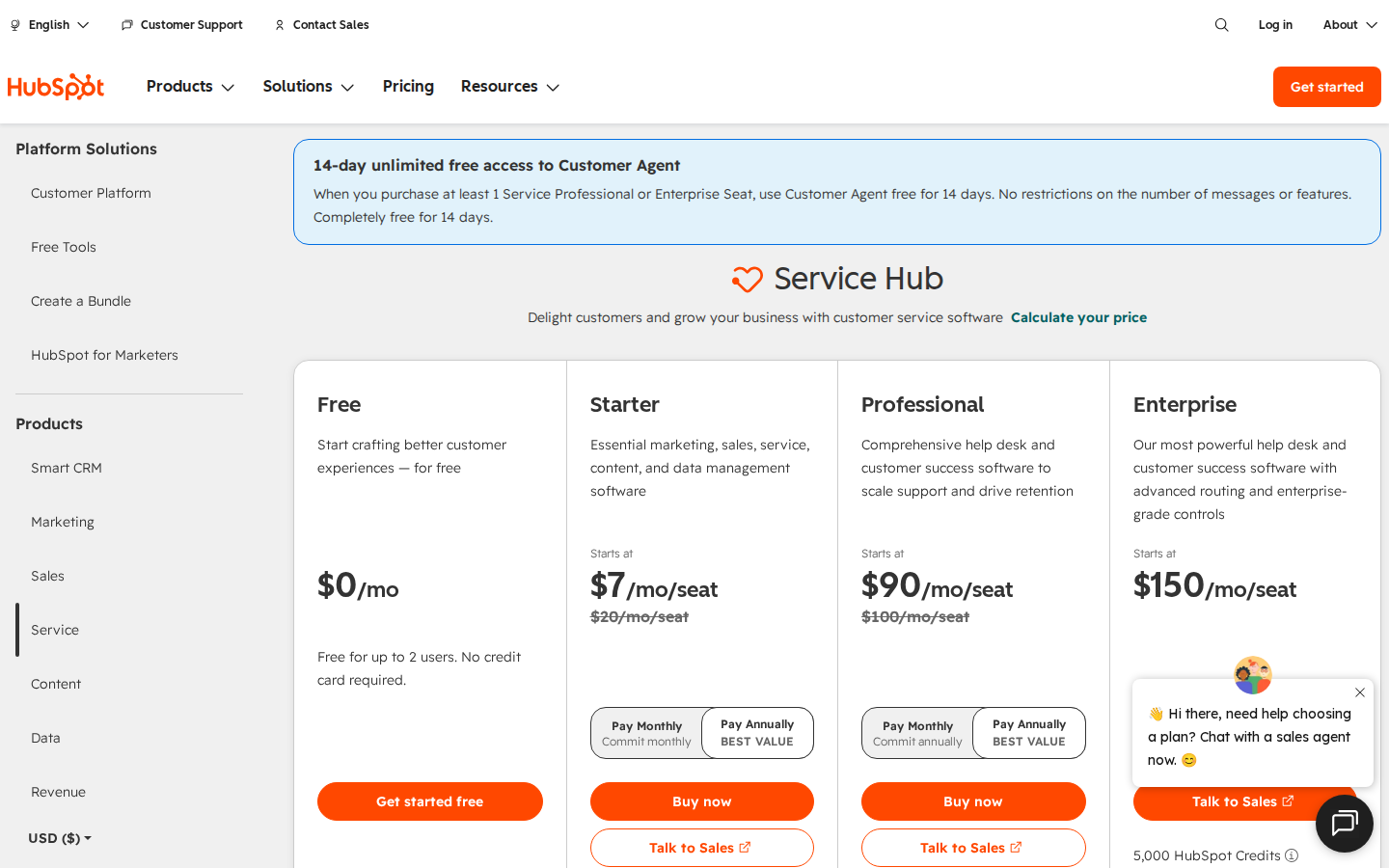
HubSpot’s public Service Hub pricing information uses seat-based plans with tier and usage considerations. Screenshot of the public product page.
Chatway is the stronger starting point for teams that primarily need live chat and practical ecommerce support without adopting a broad CRM service platform. HubSpot Service Hub is the more expansive choice for organizations that want customer support closely connected to sales, marketing, customer success, service analytics, and formal service processes.
Comparison area
Chatway
HubSpot Service Hub
Primary orientation
Live chat, ecommerce support, shared conversations, social channels, email, automation, and AI support.
CRM-connected help desk, ticketing, omnichannel service, analytics, automation, and customer success.
Free plan
Yes. One seat, unlimited conversations, 30-day chat history, FAQs and canned responses, mobile apps, widget customization, and social-channel redirect buttons. AI Support Agent is available at $0.50 per resolved conversation, with ten free AI conversations initially.
Yes. Up to two users, with live chat, ticketing, shared team email, limited conversational bots, Smart CRM contacts, and basic reporting. The free plan retains HubSpot branding and has limits on advanced service functions.
Entry paid price
Solo: displayed as $29 per month or $24 per month when billed yearly. The pricing page displays dollar amounts without an explicit currency code in the available source.
Starter headline: starts at $7 per seat per month when billed annually, subject to the offer and customer eligibility. HubSpot’s standard product catalog lists Starter at $20 per seat per month.
Higher paid tiers
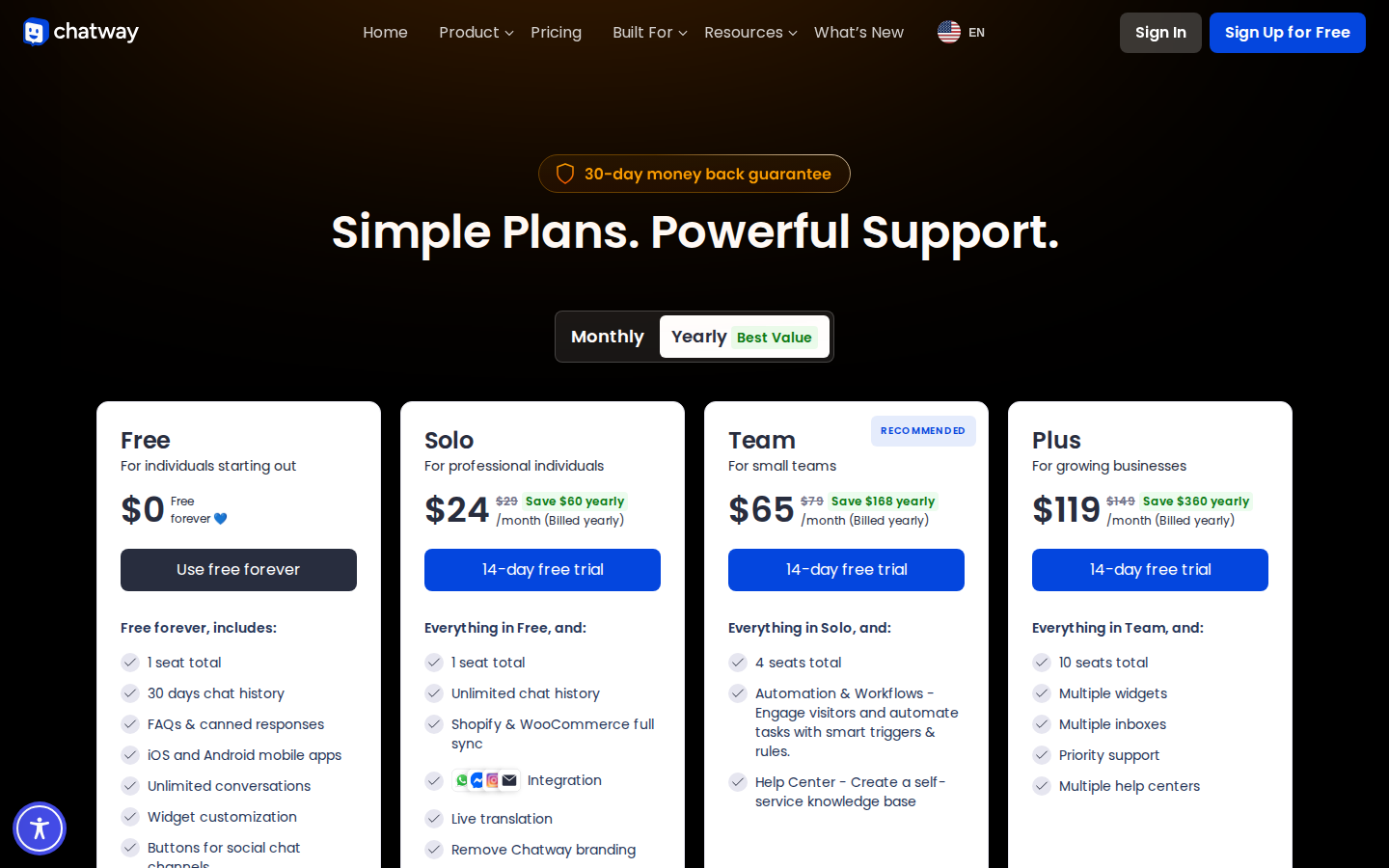
Team: $79 monthly or $65 per month billed yearly for four seats. Plus: $149 monthly or $119 per month billed yearly for ten seats.
Professional: $90 per seat per month annually or $100 with monthly billing and annual commitment. Enterprise: $150 per seat per month. Standard catalog pricing lists Professional at $100 per seat per month and Enterprise at $150.
Usage metric
AI Support Agent is charged at $0.50 per resolved conversation. Subscription plans otherwise emphasize seats, inboxes, widgets, history, and included functionality.
Seat-based subscription plus HubSpot Credits and usage-based services. The catalog says Customer Agent uses 50 credits per resolved text conversation and additional credits cost $0.010 each.
Material plan limits
Free has one seat and 30-day history. Solo adds direct Shopify, WooCommerce, WhatsApp, Messenger, Instagram, and email integrations, live translation, and branding removal. Team adds automation, workflows, and a help center. Plus adds multiple widgets, inboxes, and help centers.
Free is limited to two users and 1,000 contacts according to the product catalog. Professional lists one knowledge base with up to 2,000 articles; Enterprise lists 100 knowledge bases and up to 10,000 total articles. Included credits, calling, WhatsApp, and other capacity limits vary by tier.
Ecommerce support fit
Strong fit for stores needing Shopify and WooCommerce support, live chat, customer context, social and email conversations, order-related workflows, and AI assistance.
Strong fit when ecommerce service needs to connect with CRM records, sales activity, marketing touchpoints, reporting, and broader customer-success operations.
Advanced service operations
Shared dashboard, assignments, private notes, reminders, tags, custom data, automation, workflows, help centers, and multiple inboxes on applicable plans.
Help desk, ticketing, routing, SLA management, service analytics, knowledge base, customer portal, feedback surveys, customer health scores, and customer-success tooling, with tier restrictions.
AI
AI Support Agent is available across plans and priced by resolved conversation. Chatway also offers an API and connected knowledge sources for AI workflows.
Customer Agent and an AI knowledge-base agent are available in the HubSpot service ecosystem, with credits and tier conditions. Some AI capabilities are labeled Beta.
Features
Chatway features
Chatway focuses on the conversations that support teams handle every day. Its public product information describes a shared dashboard for website, email, and Facebook conversations, conversation assignment, mobile applications, visitor visibility, proactive conversations, surveys, real-time translation, in-widget FAQs, pre-chat forms, private notes, reminders, tags, and custom data.
For ecommerce teams, the most relevant distinction is the direct store-support orientation. The published pricing information lists Shopify and WooCommerce full synchronization on Solo, alongside direct WhatsApp, Messenger, Instagram, and email integrations. This gives a store team a way to combine shopping questions and service conversations without beginning with a large CRM implementation.
Chatway also provides widget controls, including design, behavior, and triggers. These controls can help a team decide when and where visitors see an invitation to chat. The exact availability of individual functions depends on the selected plan, so teams should confirm their required workflow before purchasing.
AI is part of Chatway’s current product direction rather than an absent capability. The AI Support Agent is available on every plan, including Free, at $0.50 per resolved conversation, with ten free AI conversations when an account starts. Chatway’s public privacy information says the AI uses explicitly connected knowledge sources and that visitor data is not used to train external AI models. That is a vendor statement, not an independent assessment of model performance.
Teams building custom workflows can also review Chatway’s API for AI agents and its webhooks for support automation. These options are particularly relevant when a company wants to connect conversations to an existing application or automation layer rather than replace its whole customer technology stack.
HubSpot Service Hub features
HubSpot Service Hub takes a broader service-management approach. HubSpot describes the product as combining an omnichannel help desk, ticketing, service analytics, SLA management, automation, customer success tooling, and the Smart CRM.
The product page advertises customer health scores, NPS and CSAT, custom surveys, call analytics, a knowledge base, a customer portal, and an AI knowledge-base agent labeled Beta. Support interactions can be connected to deal stages and marketing touchpoints, which is useful for companies that want service activity to inform account management, sales, and lifecycle marketing.
HubSpot’s service pricing guide separates capabilities by tier. Its description of the Free plan includes shared team email, Smart CRM contacts, live chat, limited conversational bots, ticketing, and basic reporting. The same guide says that Free does not include SLA tracking, advanced routing, help-desk automation, or knowledge-base connection. Starter adds functions such as branding removal, conversation routing, calling, and email templates and tracking. Professional adds help desk and customer-success workspaces, workflows, a knowledge base, a customer portal, feedback surveys, and a credit-metered Customer Agent. Enterprise adds conditional SLAs, skills-based routing, and journey analytics.
This makes Service Hub appealing when support is one part of a larger revenue and customer-success process. It also means that a team should map its desired workflow to the correct tier. Feature names on a product-family page should not be interpreted as proof that every capability is included in every plan.
Pricing
Pricing is one of the clearest differences between the two products, although the comparison requires care. Chatway’s public pricing is organized around plans with included seats and conversation-support capabilities. HubSpot’s pricing is primarily seat-based, with additional credits, onboarding, capacity, and usage considerations.
Chatway’s Free plan costs $0 and includes one seat, unlimited conversations, 30-day chat-history access, FAQs and canned responses, mobile apps, widget customization, and social-channel redirect buttons. Solo is displayed at $29 per month or $24 per month when billed yearly. Team is displayed at $79 per month or $65 per month when billed yearly and includes four seats. Plus is displayed at $149 per month or $119 per month when billed yearly and includes ten seats. The English pricing page shows dollar amounts without an explicit currency code in the available source, so these figures should be treated as displayed dollar prices rather than a confirmed currency designation.
Chatway’s AI Support Agent is a separate usage charge at $0.50 per resolved conversation. That charge should not be confused with the subscription price. The pricing information also lists a 14-day paid-feature trial and a 30-day refund window.
HubSpot lists a Free plan for up to two users. Its current USD pricing view displays a Starter headline beginning at $7 per seat per month, billed annually, but that headline is tied to the applicable offer and should not be assumed to be a permanent standard rate. HubSpot’s standard product catalog lists Starter at $20 per seat per month, Professional at $100 per seat per month, and Enterprise at $150 per seat per month. Another official pricing view lists Professional at $90 per seat per month annually or $100 with monthly billing and annual commitment, and Enterprise at $150 per seat per month.
HubSpot’s catalog also lists a one-time onboarding fee of $1,500 for Professional and $3,500 for Enterprise. The pricing page lists 500, 3,000, and 5,000 HubSpot Credits for Starter, Professional, and Enterprise respectively. The catalog says Customer Agent consumes 50 credits per resolved text conversation and that additional credits cost $0.010 each. In practical terms, that is $0.50 of additional credits per such resolution before considering the subscription and included credits, although other actions can consume credits differently.
For a small team comparing only the cost of a focused support inbox, Chatway is easier to evaluate. For a company already using HubSpot CRM and requiring broader service operations, HubSpot’s higher subscription cost may be justified by consolidation. Buyers should model seats, contacts, credits, onboarding, calling, WhatsApp usage, integrations, and capacity increases instead of comparing only the lowest headline number. You can review the current Chatway pricing page before making that calculation.
Target Audience and Best Fit
Chatway is a good fit for
Small and growing ecommerce teams that want live chat without a large service-platform rollout.
Shopify and WooCommerce businesses that need store-support conversations, order context, social channels, email, and website chat in one operating environment.
Teams that value a focused interface, mobile access, practical routing, canned responses, private notes, and customer conversation history.
Businesses that want to add AI support while paying separately for resolved AI conversations.
Companies that need an approachable starting plan and the option to add automation, workflows, help centers, multiple widgets, or multiple inboxes as operations grow.
HubSpot Service Hub is a good fit for
Organizations already invested in the HubSpot CRM and willing to manage service alongside sales, marketing, and customer success.
Support departments that need formal ticketing, routing, SLA management, customer portals, service analytics, surveys, or customer health reporting.
Companies with larger service operations that can justify seat-based pricing, onboarding, implementation planning, and usage-credit management.
Teams that need customer conversations connected to deal stages and marketing touchpoints.
Businesses with governance, audit, and procurement requirements that benefit from a public trust center and documented assurance information.
Neither product is universally better. Chatway is usually the more direct fit when the problem is fragmented customer conversations and the team wants to improve live chat and ecommerce support quickly. HubSpot Service Hub is usually the more appropriate fit when support must operate as part of a broader CRM-centered customer lifecycle.
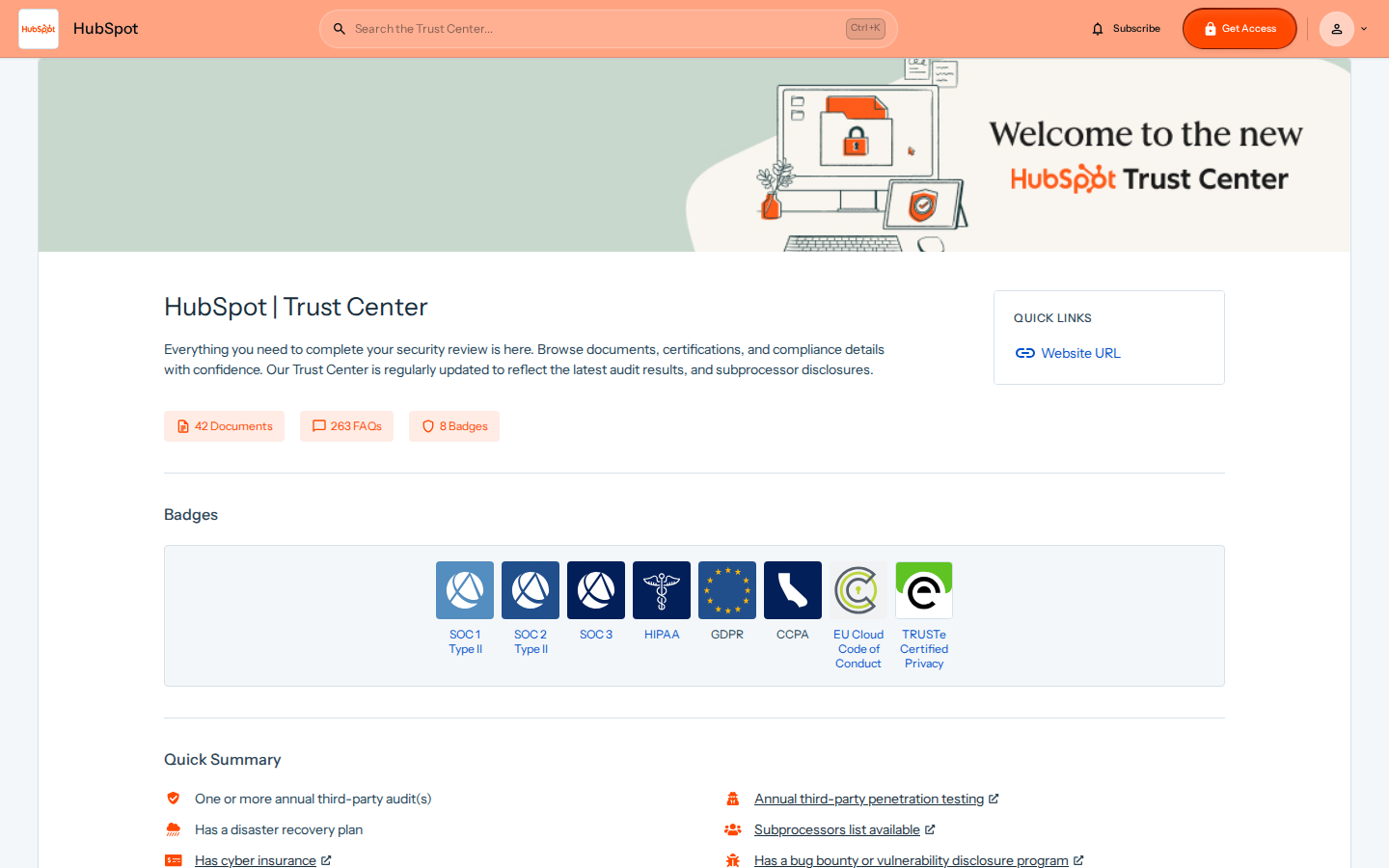
HubSpot’s Trust Center provides public information about security reports, privacy programs, and compliance-related assurances. Screenshot of the public product page.
Chatway’s published position
Chatway’s GDPR page identifies Chatway as a processor and its customer as the controller for ecommerce and AI visitor data. It describes a requestable data processing agreement, a customizable consent checkbox, access, export, and deletion rights, and retention controls that can support inactivity-based deletion after six, nine, or twelve months.
The same public page describes operational safeguards including two-factor authentication on sensitive company accounts, separated application and sensitive-data servers, IP-restricted server access, daily backups, and automated security tests. It also says that the site owner remains responsible for visitor notices and legally required consent, including disclosure of automated AI responses.
These statements are useful for an initial vendor review, but they are not independent audit findings. No Chatway SOC 2 or ISO certificate or audit report was inspected for this comparison. A public verification of Chatway HIPAA eligibility, PCI certification, regional data hosting, specific encryption algorithms, or customer-facing SSO and MFA was not established from the supplied research. Buyers with regulated workloads should request the relevant documentation and assess their own responsibilities.
HubSpot’s published position
HubSpot’s public Trust Center displays SOC 1 Type II, SOC 2 Type II, SOC 3, HIPAA, GDPR, CCPA, EU Cloud Code of Conduct, and TRUSTe privacy badges. HubSpot also announced refreshed SOC 2 Type II and SOC 3 reports, its first SOC 1 report, and a refreshed HIPAA attestation on June 23, 2026. The Trust Center links to subprocessors, privacy materials, AI model cards, and AI trust information, and describes annual third-party audits and penetration testing.
Those are stronger publicly visible assurance signals than were available for Chatway in the supplied research, particularly for procurement teams that require documented audit and compliance materials. However, a badge or trust-center listing does not establish that every Service Hub plan, configuration, integration, or customer use is compliant. The underlying audit scope, exceptions, contract terms, data flows, and implementation controls still need review.
For GDPR, CCPA, HIPAA, PCI, ISO, and SOC 2 decisions, the right conclusion is not that one platform is automatically compliant. The platforms provide different levels of publicly documented information, while the customer remains responsible for lawful configuration, notices, access controls, retention, contracts, and appropriate use of personal or regulated data.
Marketplace Reviews
Review scores are useful signals, but they are not controlled product tests. Counts change, review populations differ, and reviews can cover different plans and product generations.
As of the dated Capterra snapshot from September 28, 2026, Chatway was shown at 4.9 out of 5 from 80 reviews. Capterra displayed an ease-of-use score of 5.0 and a customer-service score of 4.8. Visible themes included straightforward setup, a clear interface, positive usability, and occasional reports of loading delays or requests for deeper customization and automation. The indexed page also identified review-source labels, including non-incentivized submissions. The page was not directly retrievable during the research session, so this should be treated as a dated indexed snapshot. See the Chatway Capterra reviews page for the platform’s current display.
Capterra’s September 28, 2026 snapshot showed HubSpot Service Hub at 4.4 out of 5 from 193 reviews, with ease of use at 4.4 and customer service at 4.5. Review themes included cross-team alignment, centralized support resources, and ticket context. Other visible comments mentioned interface complexity, higher-tier expense for smaller businesses, and workflows that could require workarounds. Some displayed reviews were marked as vendor-referred or incentivized, so their source labels matter when interpreting the aggregate.
G2’s accessible indexed French Service Hub page showed 4.4 out of 5 across 2,891 reviews in an approximately six-month-old snapshot. G2’s generated summary described praise for usability, automation, centralized conversations, and ticket organization, with cost and higher-tier access mentioned as drawbacks. Because a newer seller listing showed a different count and the English review page was not directly accessible, no current exact G2 total is established for October 2026. These figures should not be treated as a precise current rating.
Trustpilot’s accessible Chatway profile showed 4.9 out of 5 from 257 reviews, including 62 reviews in the preceding twelve months. The displayed distribution was 95% five-star, 5% four-star, under 1% three-star, 0% two-star, and under 1% one-star, subject to rounding. Trustpilot itself warns that reviews may not be representative, and the profile stated there was no recent review-invitation history. This score should not be compared with a company-wide HubSpot profile as though it measured Service Hub alone.
The balanced interpretation is that Chatway’s available review snapshots show particularly strong reported ease of use and customer service, while HubSpot Service Hub has a larger review footprint and recurring praise for breadth and centralized context. The same sources also surface the tradeoff: broader platforms can bring more complexity and higher-tier expense, while focused platforms may lead some teams to request deeper customization.
Which platform should you choose?
Choose Chatway if your immediate objective is to provide faster, more organized live chat and ecommerce support. Its free plan, focused paid tiers, direct store integrations on Solo, mobile apps, shared conversations, automation options, help-center capabilities, and separately priced AI Support Agent make it a practical choice for teams that do not need to rebuild their entire customer-data architecture.
Choose HubSpot Service Hub if your service team is already part of a HubSpot-centered operating model or needs advanced service functions such as formal SLA management, customer-success workspaces, customer portals, detailed service analytics, conditional routing, and CRM-connected lifecycle context. The public Trust Center and documented assurance materials may also be important for larger procurement processes.
Before deciding, write down the channels you need, the number of agents, the number of inboxes and widgets, the expected AI resolutions, the required knowledge-base capacity, the CRM and ecommerce connections, and any compliance documentation your procurement team requires. Then compare the complete operating cost rather than the first advertised monthly figure.
FAQs
Is Chatway cheaper than HubSpot Service Hub?
For a small team that mainly needs live chat and ecommerce support, Chatway is generally easier to price and starts with a lower-complexity paid structure. Chatway lists Solo at $29 monthly or $24 per month billed yearly, while HubSpot displays a promotional Starter headline beginning at $7 per seat monthly when billed annually and lists a standard catalog rate of $20 per seat monthly. HubSpot also has higher Professional and Enterprise tiers, onboarding fees on applicable plans, credits, and usage considerations. Compare the complete configuration before drawing a final cost conclusion.
Does Chatway have AI support?
Chatway’s public pricing page shows its plan structure, included seats, and AI Support Agent usage charge. Screenshot of the public product page.
Yes. Chatway’s AI Support Agent is available on every plan, including Free, at $0.50 per resolved conversation, with ten free AI conversations when an account starts. Chatway also describes connected knowledge sources and an API for AI-agent workflows. The AI charge is separate from the subscription fee.
Which tool is better for Shopify or WooCommerce support?
Chatway is a strong fit when the main requirement is direct ecommerce conversation support. Its published pricing information lists Shopify and WooCommerce full synchronization on Solo, along with direct WhatsApp, Messenger, Instagram, and email integrations. HubSpot Service Hub can be a strong choice when ecommerce support must connect to broader CRM, sales, marketing, customer-success, analytics, and service processes.
Does either platform have SOC 2 or ISO certification?
HubSpot’s public Trust Center displays SOC 1 Type II, SOC 2 Type II, SOC 3, HIPAA, GDPR, CCPA, EU Cloud Code of Conduct, and TRUSTe information, and describes third-party audits and penetration testing. No Chatway SOC 2 or ISO certificate or audit report was independently inspected in the supplied research. Neither statement automatically makes every customer implementation compliant.
Conclusion
Chatway and HubSpot Service Hub solve overlapping but different problems. HubSpot Service Hub offers broader CRM-connected service operations, more extensive publicly documented assurance materials, and a strong fit for organizations that need support, sales, marketing, and customer success to work from one platform. Its breadth can justify the investment for the right organization, but teams should account for seat pricing, plan gates, onboarding, credits, and implementation complexity.
Chatway is the better fit for many small and growing ecommerce and support teams because it keeps the core job – handling customer conversations efficiently – more focused. Its published plans, direct ecommerce orientation, live chat workflow, mobile access, automation path, help-center options, and available AI provide a transparent route from basic support to more capable operations. Based on the verified capabilities and pricing information available for this comparison, Chatway offers the stronger combination of value, usability, and workflow fit for teams that do not need a full CRM service suite. Sign up for Chatway to evaluate that focused support workflow for your own team.